SSO Gateway
A centralized authentication portal I built for my applications, giving me one place to sign in, launch tools, manage account security, and quickly access frequently used apps.
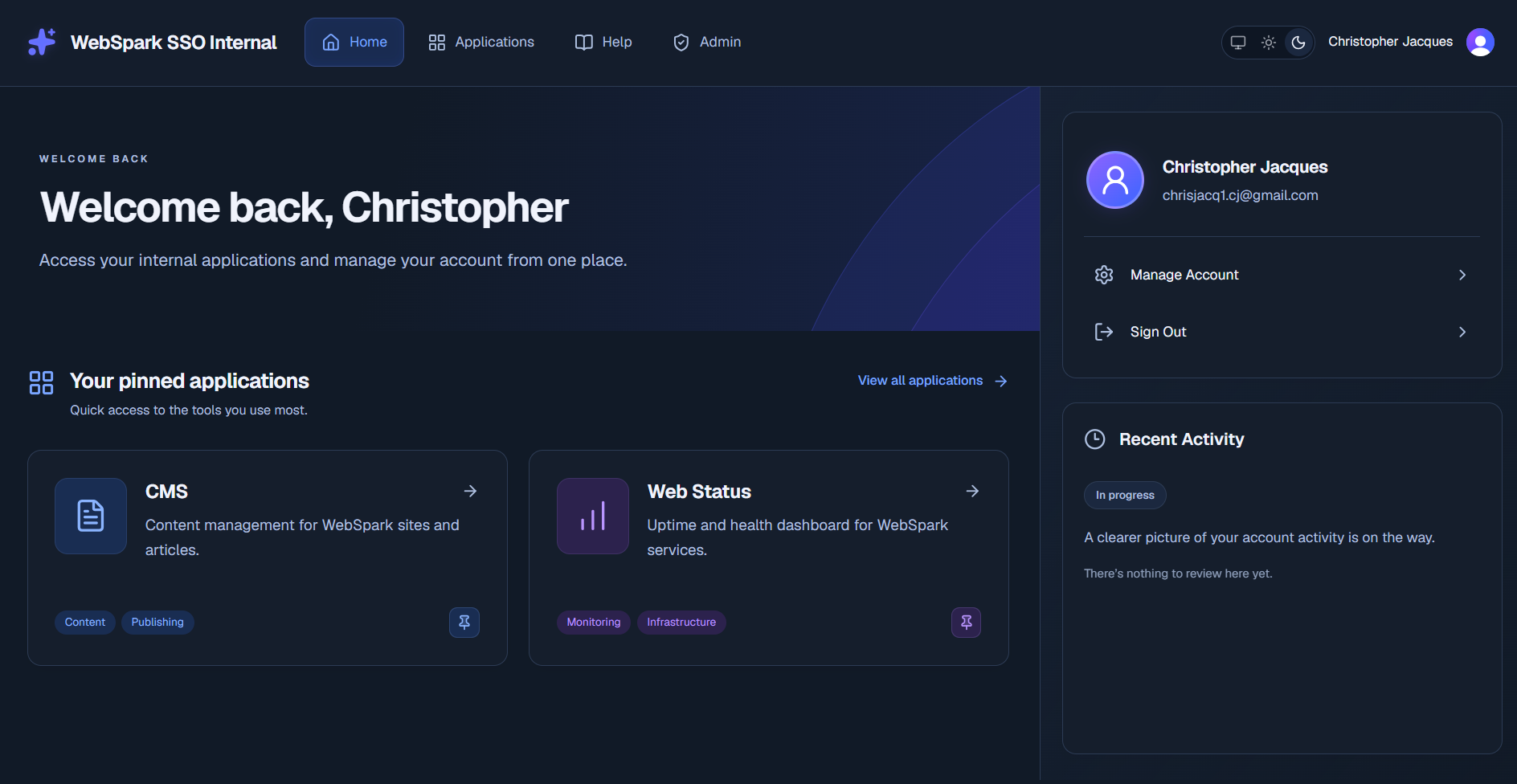
Overview
SSO Gateway is the centralized authentication layer I built for my applications. Rather than implementing and maintaining authentication separately inside every project, I route authentication through one dedicated gateway and use the same Clerk-backed identity experience across my applications.
This gives me one authentication surface to maintain, monitor, and harden. When I improve authentication behavior or strengthen the gateway, I can focus that work in one place instead of trying to keep several independent implementations consistent.
The gateway also doubles as an internal application launcher. Once signed in, I can see the applications available to my account, pin frequently used tools to Home, manage my account and security settings, and launch the rest of the WebSpark ecosystem from the same interface.
Problem / Motivation
As my ecosystem grew, I did not want authentication to become duplicated infrastructure.
Building a separate login flow for every application would mean maintaining the same sensitive functionality multiple times, creating more places for configuration mistakes, inconsistent behavior, and security issues to appear.
I wanted a simpler model:
- one authentication gateway for the WebSpark ecosystem
- one identity provider and session experience
- one place to strengthen authentication controls
- one place to monitor authentication traffic
- consistent application-to-authentication-to-application navigation
- each application remaining responsible for its own authorization and protected resources
This lets me spend more time improving one authentication system instead of repeatedly implementing smaller authentication systems inside individual applications.
Core Features
Centralized WebSpark authentication
My WebSpark applications use the same authentication gateway and identity experience. When authentication is required, the application can route through my SSO Gateway and then continue back into the WebSpark environment after authentication.
For me, the main benefit is consistency. Account management, session handling, sign-in behavior, and the security surrounding authentication all have a central place to live.
Personalized application launcher
The gateway is also the starting point for the rest of my WebSpark tools.
The Home screen shows the applications I use most frequently, while the Applications page provides the complete set assigned to my account. Applications include descriptions and categories, and I can search or filter the catalog when needed.
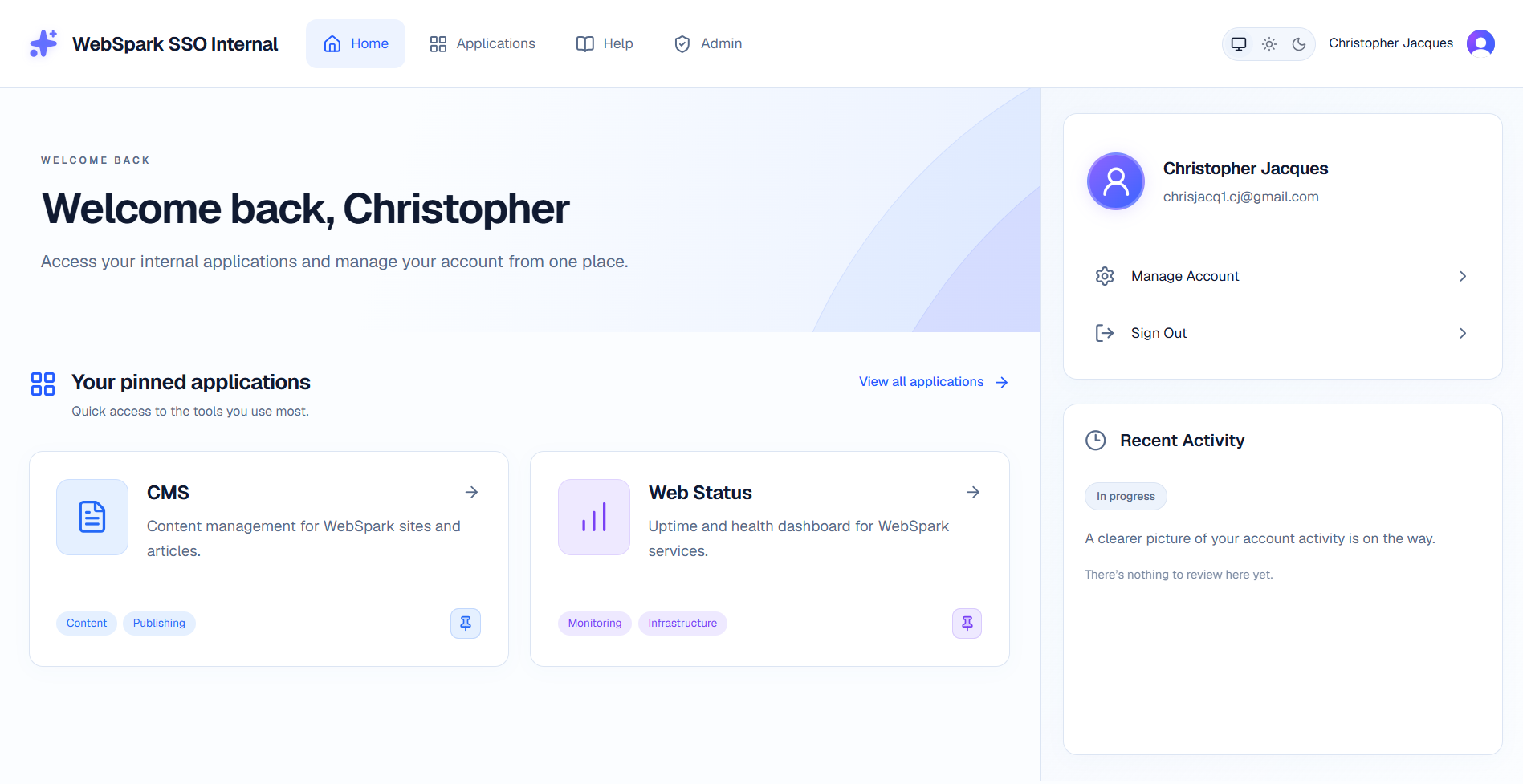 The gateway provides a single starting point for my WebSpark identity, applications, and account controls.
Search, categories, and persistent favorites
The Applications view lets me search across application names, descriptions, and categories. I can also pin the tools I use most often so they appear directly on Home.
Those preferences follow my account rather than being stored only in the browser.
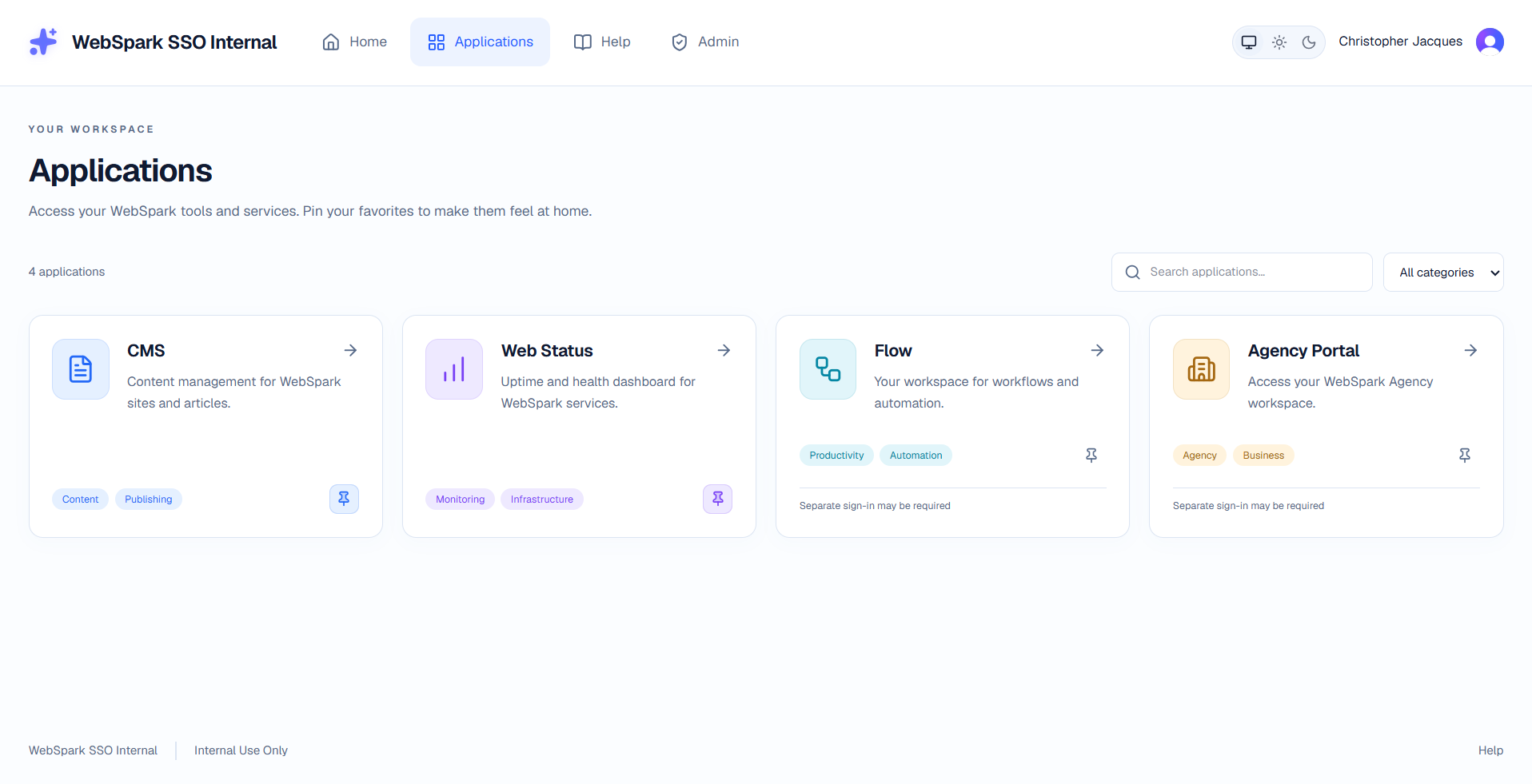 Assigned WebSpark applications are organized in a searchable catalog with account-level favorites.
Central account and session security
Account management is handled through Clerk's identity interface rather than through a custom password or session-management implementation.
From the gateway I can access profile and security settings, update authentication information, and review active device sessions from the same identity system used throughout my WebSpark environment.
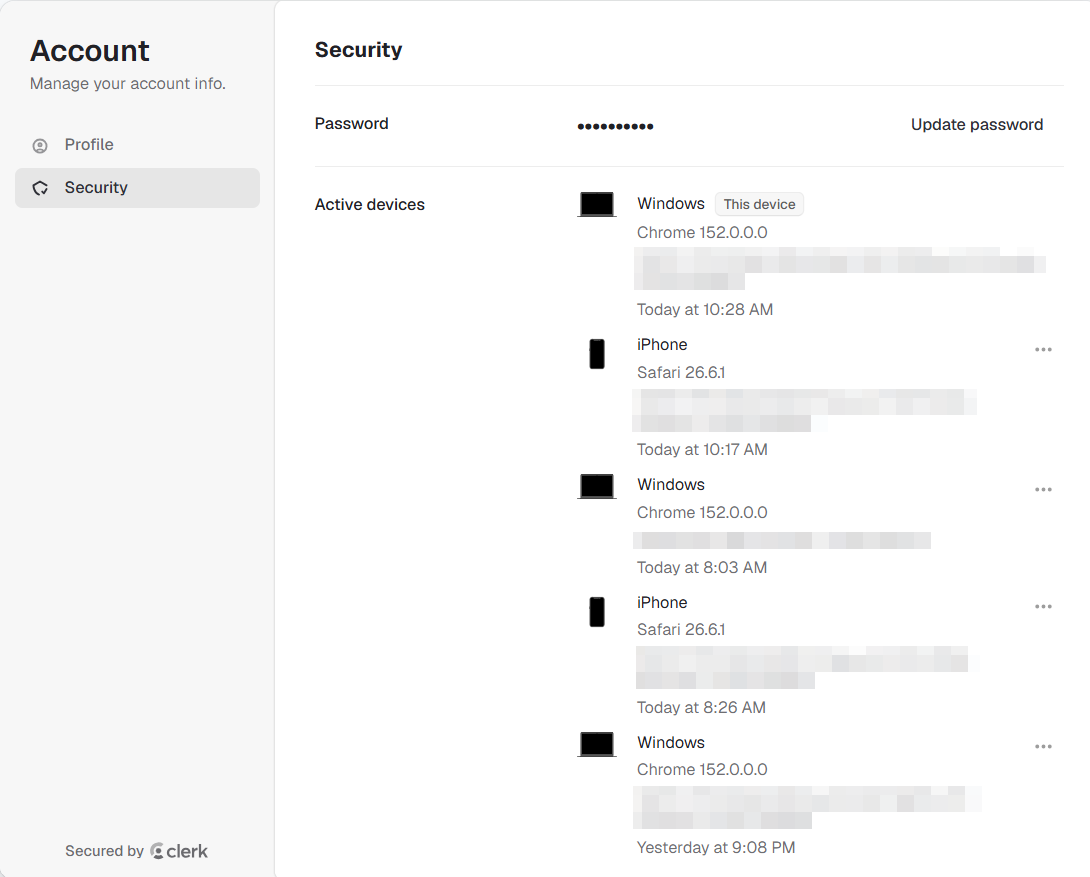 Central account security includes password management and visibility into active device sessions.
One Authentication Surface to Harden
The most important architectural decision behind the project was treating authentication as shared infrastructure instead of repeating it inside every application.
Authentication is security-sensitive code and configuration. The more independent implementations I have, the more places I would need to maintain, test, monitor, and keep consistent.
With SSO Gateway, I can concentrate that work on one dedicated authentication application.
That means improvements to the authentication experience, account security, redirect handling, or gateway configuration can be made at the central layer rather than recreated project by project.
It also gives the WebSpark ecosystem a consistent identity boundary: applications can focus on their own functionality while the gateway focuses on authentication.
Secure SSO Return Routing
A central gateway still needs to know where someone should go after authentication.
If I reach authentication from another WebSpark application, the gateway can preserve the approved destination and return me to the application I was originally using instead of always sending me to a generic homepage.
Because return URLs are security-sensitive, the project validates them instead of blindly redirecting to whatever value is supplied.
The implementation uses an explicit list of trusted WebSpark origins and rejects malformed, ambiguous, duplicated, or untrusted redirect values. Valid application paths, query strings, and fragments can still be preserved so the authentication flow remains practical for real application navigation.
This is one of the main areas where the project goes beyond simply embedding a sign-in component.
Centralized Authentication Analytics
Because authentication flows through a dedicated gateway, it also gives me one place to observe authentication traffic.
I use Vercel Analytics on the gateway to track visits and understand how frequently the authentication site is being reached. This gives me centralized visibility instead of trying to monitor authentication entry points independently across every application.
That information helps me verify that the gateway is being used consistently and gives me another signal when reviewing how the authentication experience is performing across my WebSpark projects.
Centralizing both authentication and its traffic data supports the same overall goal: maintain and improve one well-defined authentication layer rather than several disconnected ones.
Assignment-Aware Access
The gateway uses account metadata to determine which applications appear in the launcher and whether the account has access to gateway administration functionality.
These checks happen on the server rather than relying on the browser to decide which applications or administrative routes should be available.
The application also deliberately keeps launcher assignments separate from permissions inside each application. Showing an application in the gateway makes it discoverable; it does not replace the authorization rules protecting that application's resources.
Malformed or unknown assignments fail closed instead of accidentally expanding access.
Technical Implementation
WebSpark SSO Gateway is built with Next.js, React, and TypeScript using the App Router.
Clerk handles identity, authentication sessions, and account security. Next.js server-side logic handles protected routes, application assignments, administrator checks, authentication return validation, and preference persistence.
The project does not require a separate application database. The available WebSpark applications are defined by the gateway, while Clerk metadata stores lightweight account assignments and user preferences such as pinned applications.
Client-side React handles interactions that benefit from immediate feedback, including application search, category filtering, theme controls, and optimistic pin updates. Sensitive operations remain on the server.
Vercel Analytics provides centralized traffic analytics for the authentication site so I can monitor how often the gateway is being reached.
The project also contains focused automated tests around the security-sensitive parts of the gateway, including malformed permissions, server authorization boundaries, authenticated preference changes, revoked assignments, and unsafe authentication redirects.
Architecture / Tech Stack
Frontend:
Next.js, React, TypeScript, Tailwind CSS, shadcn/ui, Lucide
Backend:
Next.js Server Components, Server Actions, server-side route protection
Data / Preferences:
Clerk metadata; no separate application database
Authentication:
Clerk, centralized through WebSpark SSO Gateway
Analytics:
Vercel Analytics for authentication gateway traffic and visits
Integrations:
Clerk account management, next-themes, Vercel Analytics
Important Logic:
SSO return validation, exact-origin allowlisting, server-side assignment filtering, role-based administration, authenticated preference persistence, and fail-closed permission handling
Summary
- Centralized authentication into one gateway so security improvements and hardening do not need to be reproduced across every WebSpark application.
- Kept authentication, application visibility, and application-level authorization as separate security boundaries.
- Added explicit validation to cross-application authentication returns rather than trusting arbitrary redirect destinations.
- Kept sensitive identity and permission operations server-side while using Clerk metadata for lightweight configuration and preferences.
- Centralized authentication traffic analytics alongside the authentication layer to make gateway usage easier to observe.