Security/Vulnerability Scan Console
A personal security intelligence console I built to centralize automated security scan results, investigate vulnerabilities across repositories, and generate AI-assisted summaries of the latest findings.
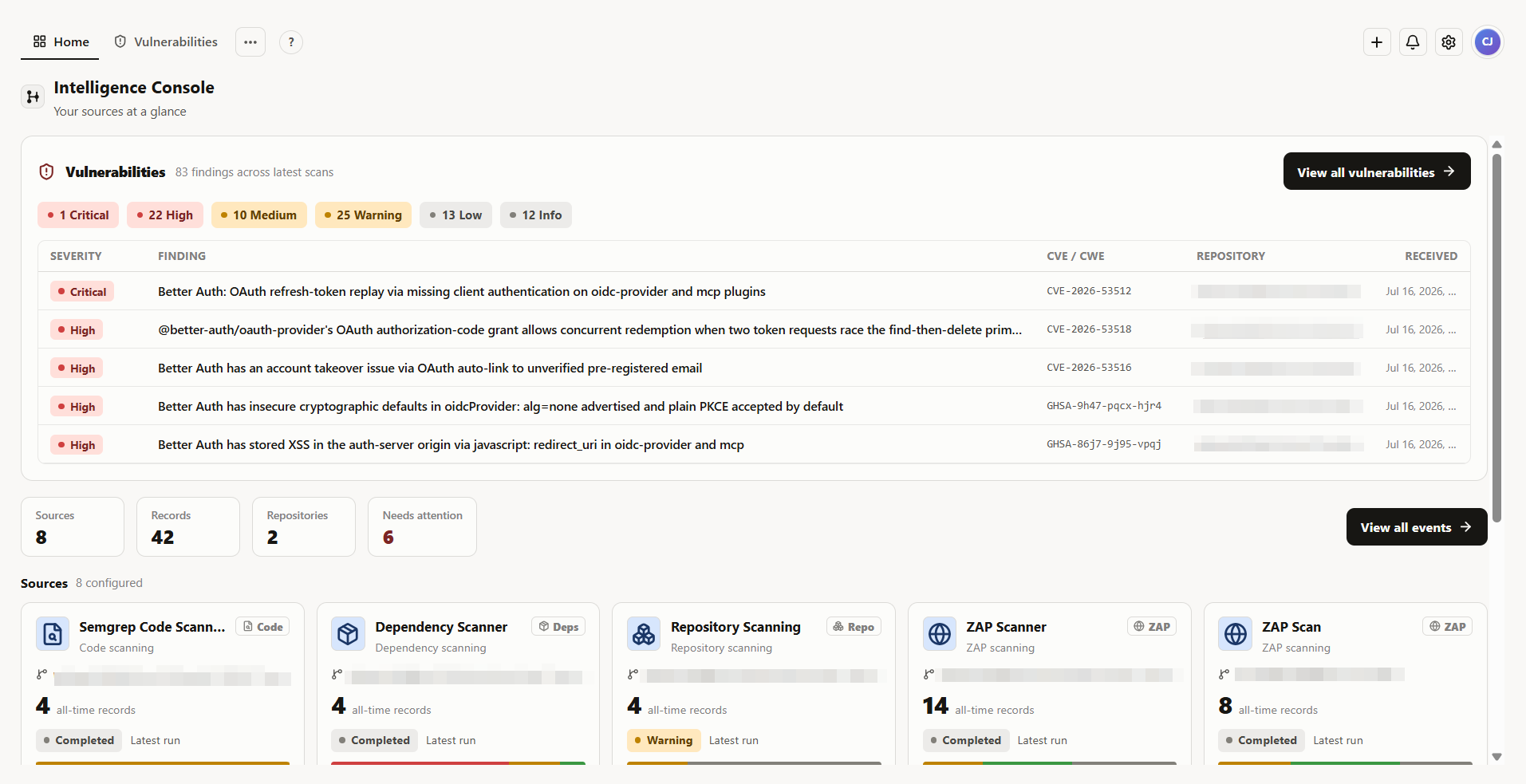
Overview
Security Scan Console is a personal cybersecurity and DevSecOps project I built for my own security workflow. I wanted one place where I could collect results from multiple automated scanners, review the most important findings across repositories, and move from a high-level security overview into the details of an individual vulnerability.
Instead of opening separate GitHub Actions runs and reading different JSON, SARIF, and scanner-specific reports, Security Scan Console receives those results through signed webhooks and turns them into a consistent interface. The application preserves the original scanner data while also normalizing the parts I need for day-to-day review, such as severity, CVEs, affected packages, fixed versions, repositories, scanners, and references.
The project also includes an AI-assisted analysis workflow. I can select recent scanner runs, send them to a local Claude Code or Codex integration, and receive a persistent security summary focused on the most important findings and next steps.
The main dashboard brings the latest vulnerability findings and scanner activity into one security-focused view.
Problem / Motivation
My security scans were producing useful information, but the results were spread across individual GitHub Actions runs and several different tool formats. A dependency scan, repository audit, and web application scan could all describe security issues differently, which made it harder to get a quick picture of the current state of a project.
I wanted a better way to answer practical questions such as:
- What are the highest-priority findings right now?
- Which repository and scanner produced a finding?
- What version is affected, and what version fixes it?
- Is this result from the newest scan or older history?
- Can I review several scanner results together instead of reading each report individually?
The goal became a lightweight security console that keeps the original evidence but creates a common investigation workflow around it.
Core Features
Centralized security monitoring
The home view summarizes the newest scanner results across configured repositories. It highlights the most important vulnerability findings, groups them by severity, and gives me a quick view of configured sources, repositories, stored events, and sources that need attention.
Security Scan Console supports separate source types for code scanning, dependency scanning, repository scanning, ZAP scanning, general GitHub Actions reports, IOC enrichment, Neon storage telemetry, vulnerability events, and generic structured records.
Vulnerability investigation
The Vulnerabilities view turns findings embedded inside scanner reports into a finding-focused table. I can review severity, CVE or CWE identifiers, affected targets, repositories, scanner types, and when the result was received.
The application uses the latest run from each repository and scan type by default rather than treating one globally newest record as the entire current state. I can also narrow the view by repository or scan type and search across the normalized findings.
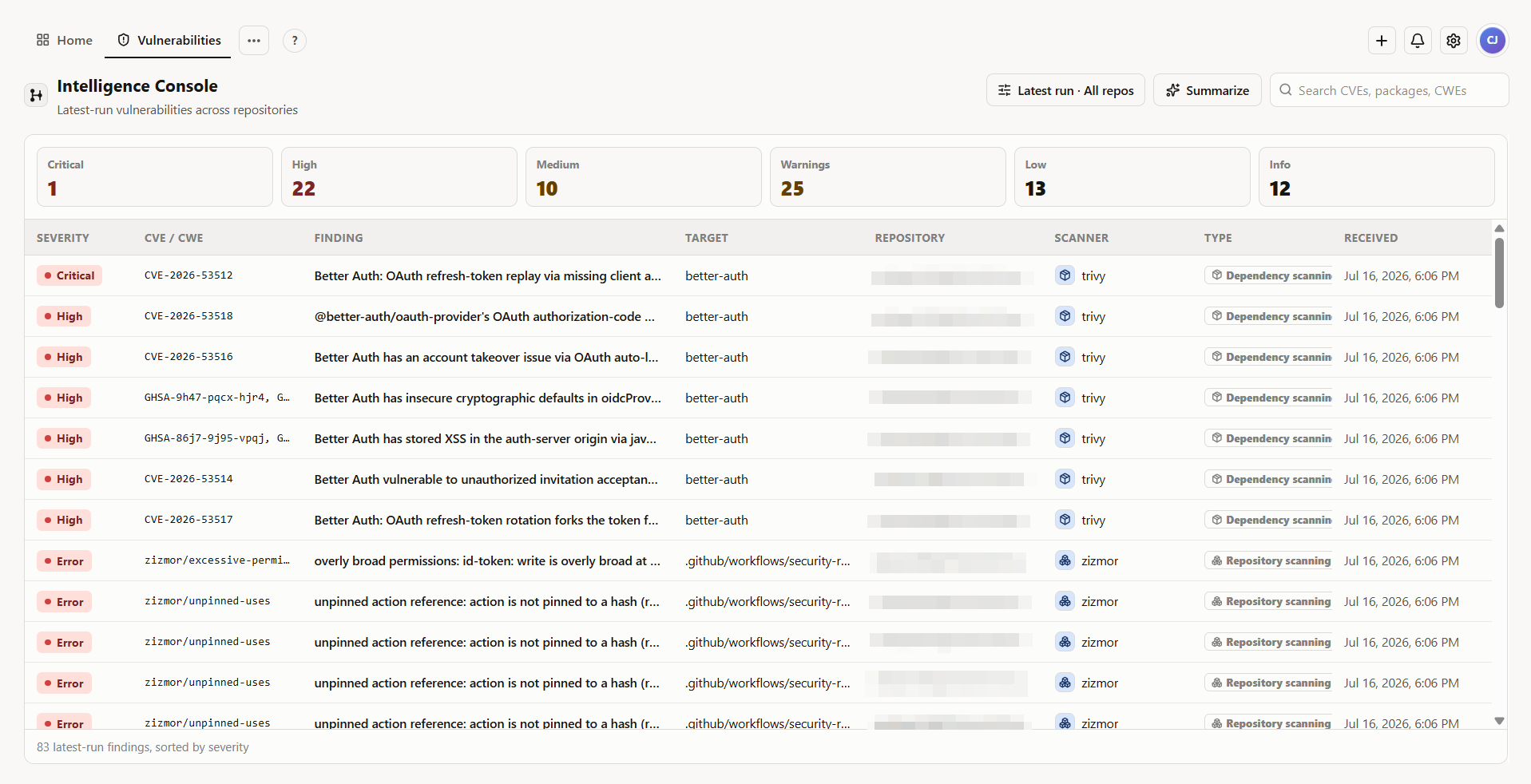 Findings from different security scans are presented through one consistent vulnerability review workflow.
Selecting a finding opens a deeper investigation view with information such as the affected package, installed and fixed versions, CVE/GHSA/CWE identifiers, description, remediation information, references, and links back to the original event or GitHub Actions run when available.
Security event history and source management
Beyond the vulnerability-specific view, Security Scan Console keeps the underlying scanner events available for inspection. Records can be searched, paginated, filtered by source or repository, and viewed as either normalized data or the original JSON payload.
Sources can also be associated with repositories so that separate code, dependency, repository, and web scans still belong to the same logical project. Historical events reference that repository relationship instead of storing duplicate repository names on every record.
AI-assisted analysis
From supported security views, I can start an AI summary of the latest scanner results. The workflow shows which AI integrations are available, lets me review which scan runs will be included, and provides a rough payload-size estimate before the analysis starts.
Current working integrations use locally installed Claude Code and OpenAI Codex CLI sessions. A hosted Anthropic API backend is scaffolded in the project but is not yet implemented.
Completed summaries are stored as tasks rather than disappearing when I leave the page. I can return later, track running work through the notification interface, and open a full report with the exact scanner sources that were analyzed.
Standout Feature: Signed Security Report Ingestion
A major part of Security Scan Console is the ingestion pipeline behind the interface.
Each configured source receives its own webhook URL and signing secret. External producers send JSON to that endpoint using an HMAC-SHA256 signature. The server verifies the signature against the exact raw request body before parsing or storing the event.
This matters because the console is receiving security information from automated systems rather than only accepting data entered through the browser.
After verification, Security Scan Console stores both forms of the event:
- the original raw payload for evidence and troubleshooting
- a normalized representation for searching, filtering, dashboards, and investigation
That approach lets the interface evolve without throwing away scanner-specific information that may become useful later.
The repository also includes a GitHub Actions security workflow and a shared Python reporting adapter. The workflow can orchestrate tools including Semgrep, Trivy, OWASP ZAP, Gitleaks, zizmor, and optional CodeQL or dependency-review checks. The adapter parses supported report files, extracts structured findings and severity information, adds repository and workflow context, signs the finished payload, and sends it back to Security Scan Console.
Standout Feature: Finding-Level Vulnerability Investigation
Scanner runs and individual vulnerabilities are treated as separate concepts.
A single dependency scan may contain several findings, so Security Scan Console expands the findings inside a scanner event into a separate investigation model. It extracts security identifiers and useful context such as CVEs, GHSAs, CWEs, packages, installed versions, fixed versions, file locations, references, descriptions, and recommended solutions when the originating scanner provides them.
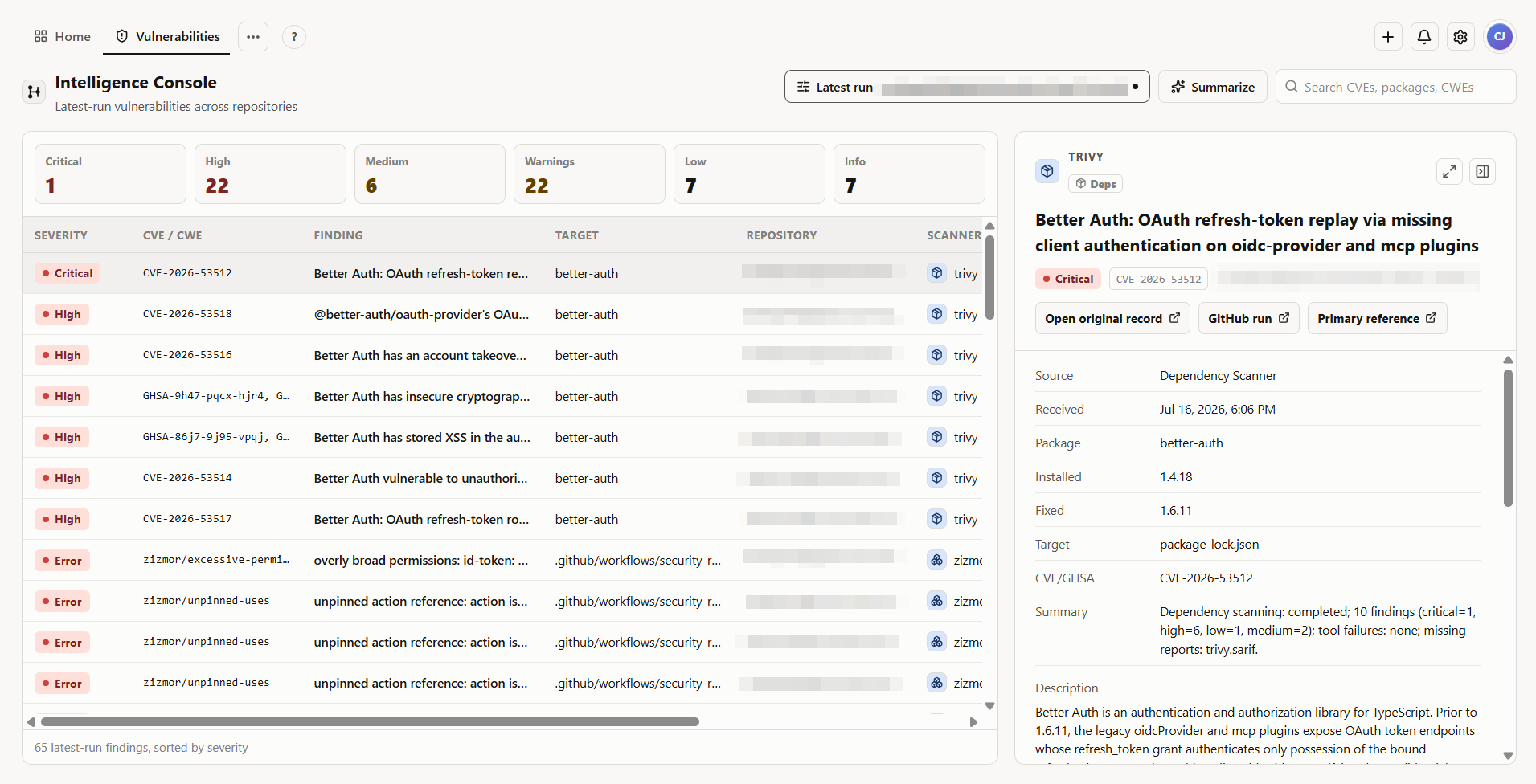 A finding can be expanded from the vulnerability table into a detailed investigation view with remediation and source context.
The result is more useful to me than simply storing the scanner's output because I can start with the security issue itself and still follow it back to the original scan when I need more context.
Standout Feature: AI Security Summaries
Security Scan Console's AI functionality is designed around the scanner data already stored in the application rather than a generic chatbot.
When I start a summary, the server first resolves the newest applicable scanner runs. The browser can narrow that authorized set, but it cannot supply arbitrary record IDs and use the summarization endpoint to reach unrelated or older data.
Before running the job, the interface shows available integrations and lets me decide which scanner runs should be included.
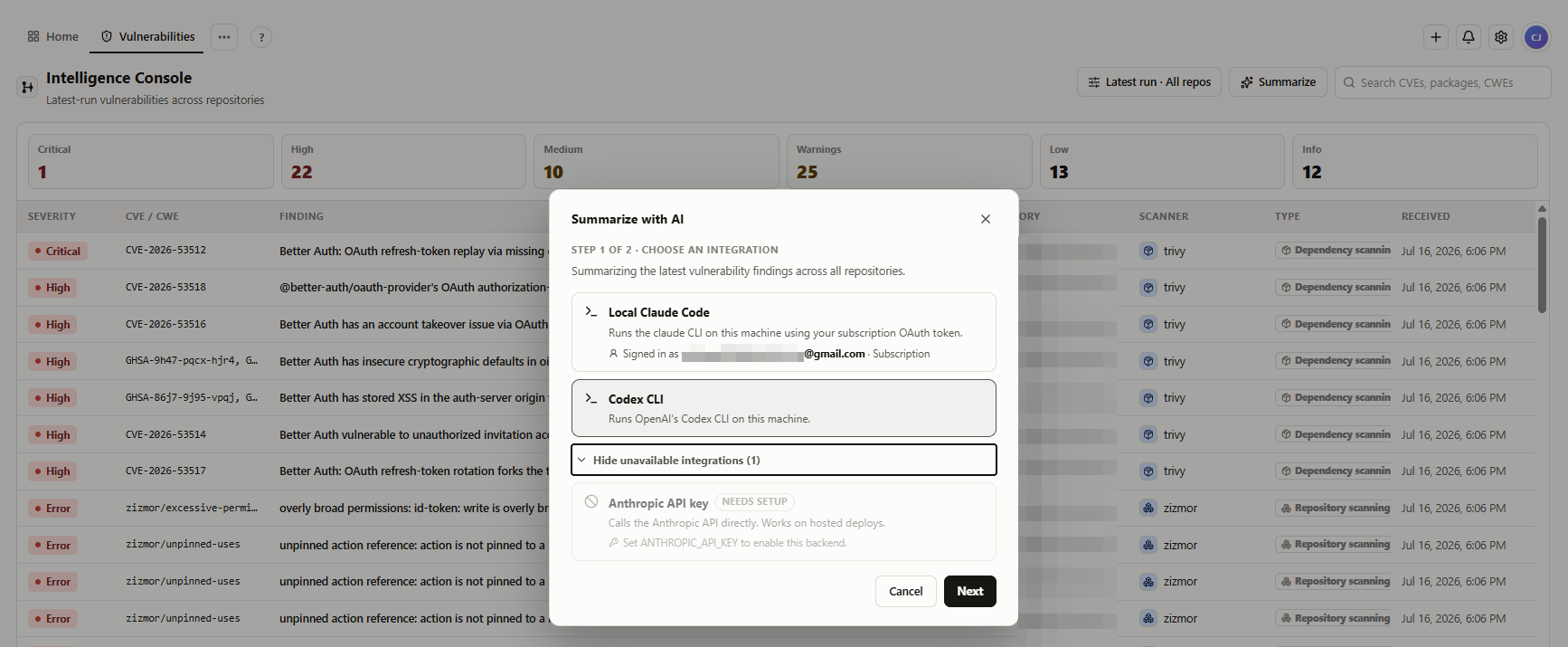 AI integrations are detected at runtime so I can choose an available local analysis backend before starting a summary.
The Claude Code and Codex implementations run in temporary working directories rather than using the application repository as their workspace. The Codex integration runs without interactive approvals and uses a read-only sandbox for the analysis process.
The summarization prompt is also bounded so unusually large scan runs cannot grow without limit. The application prioritizes the newest records and sends normalized data rather than unnecessarily duplicating the complete raw payload.
AI work is modeled as a persistent task with queued, running, completed, and failed states. That means the user interface does not need to keep one request open until the model finishes.
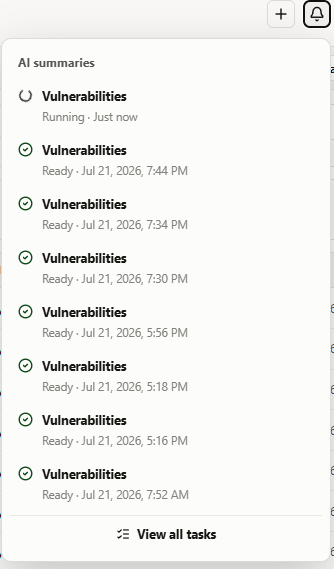 AI analysis runs are persisted as tasks, allowing progress and completed reports to remain available after navigating away.
When a run completes, Security Scan Console presents the final Markdown report together with the execution backend, timestamps, scanner sources, run count, and the scope of the data that was actually analyzed.
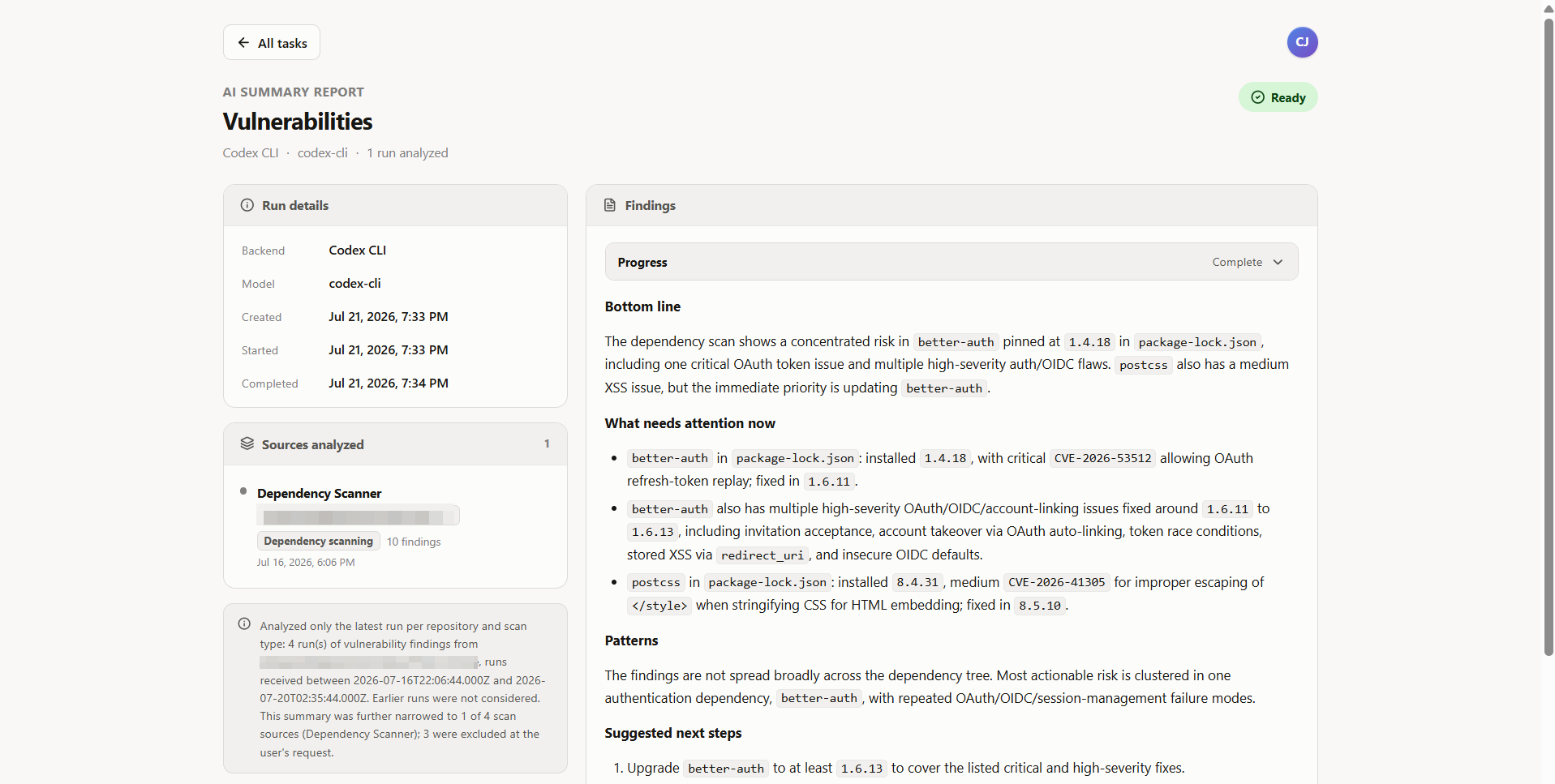 A completed Codex analysis combines prioritized security findings with the exact scan sources and execution details behind the report.
Technical Implementation
Security Scan Console is built with Next.js and React, with server-side route handlers responsible for database access, authentication checks, webhook verification, normalization, vulnerability extraction, repository scoping, and AI job orchestration.
Neon PostgreSQL stores sources, repositories, raw and normalized records, archive state, and AI summary jobs. The project uses direct SQL rather than an ORM, including JSONB, window functions, partial indexes, lateral joins, and repository-based partitioning for latest-run queries.
Authentication uses Neon Managed Better Auth. Protected console and knowledge-base routes require a session, and privileged operations such as creating new sources, creating repositories, and launching AI summaries use an administrator role stored with the authenticated Neon user.
For automation, GitHub Actions runs the repository security checks and a Python adapter converts supported scanner output into a common webhook payload. Security Scan Console then handles visualization and investigation independently of the scanner that originally produced the finding.
The working AI backends currently run on the local Node.js environment because they launch installed CLI processes. The rest of the application architecture can operate independently of those local integrations.
Architecture / Tech Stack
Frontend: Next.js 16, React 19, TypeScript, Tailwind CSS, Lucide React
Backend: Next.js route handlers, Node.js, direct PostgreSQL queries
Database: Neon PostgreSQL, JSONB, SQL window functions and partial indexes
Authentication: Neon Managed Better Auth
Security & Automation: GitHub Actions, HMAC-SHA256 signed webhooks, Python report adapter, Semgrep, Trivy, OWASP ZAP, Gitleaks, zizmor
AI Integrations: OpenAI Codex CLI, Claude Code CLI
Important Logic: scanner-data normalization, latest-run resolution per repository and scan type, finding extraction, severity prioritization, bounded AI prompt construction, persistent AI task state
Engineering Summary
- Preserved raw scanner evidence alongside normalized data so the UI can use a common model without losing source-specific details.
- Modeled "latest security state" per repository and scan type instead of using a single globally newest event.
- Protected automated ingestion with per-source HMAC signing and constant-time signature verification.
- Separated AI execution from the browser through persistent summary jobs and short-lived job callback credentials.