"Memo" A Flashcard/Study App
Adaptive flashcard and exam-preparation platform with spaced repetition, performance-based questions, voice-powered study sessions, and personalized learning analytics.
Overview
Memo is a personal study platform I built for my own certification and technical study workflow.
I wanted something more flexible than a normal flashcard app—especially for large study decks where reviewing every card over and over becomes inefficient. Memo keeps track of how well I remember each card, decides what needs to be reviewed again, and helps me focus on the material I struggle with most.
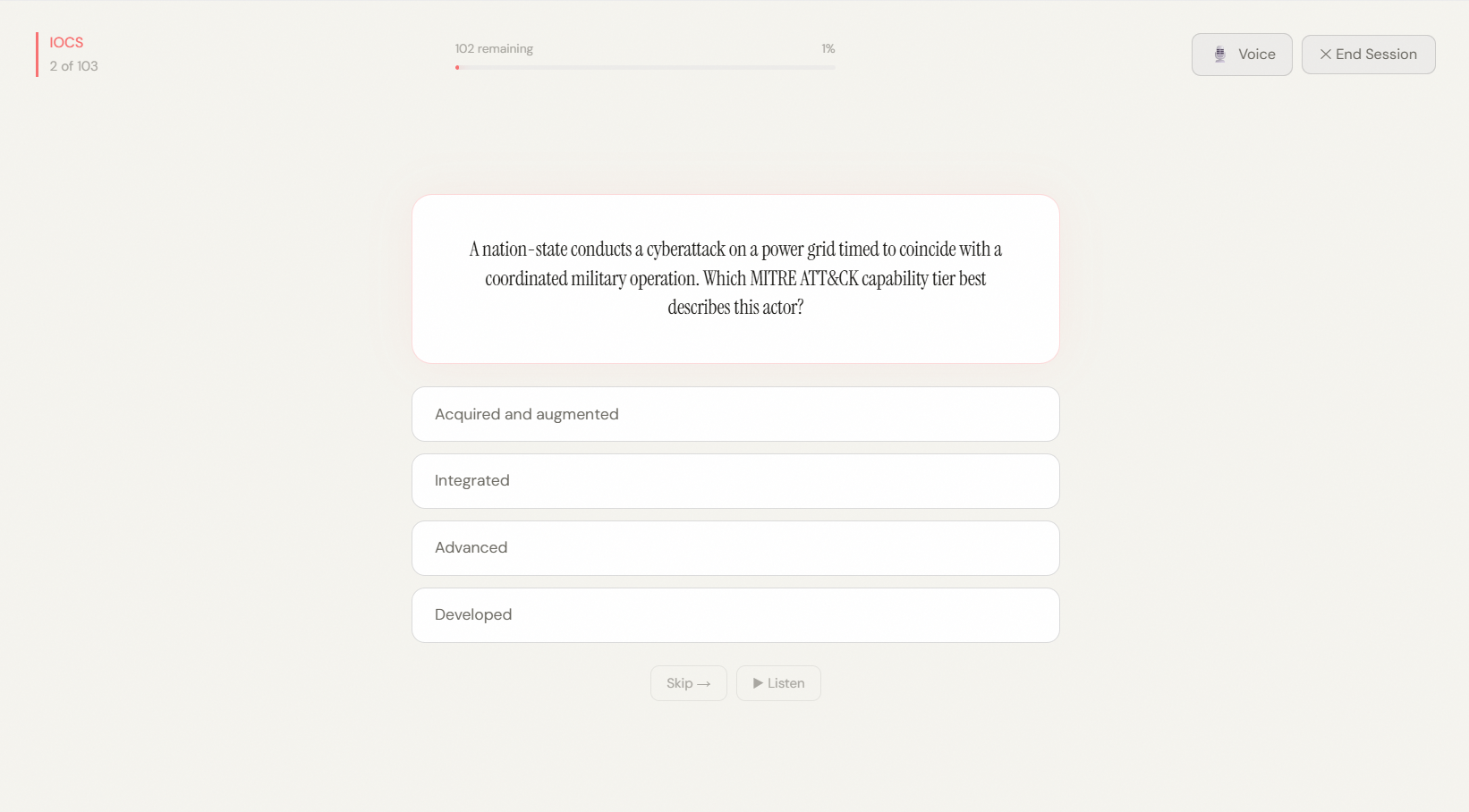
The project grew beyond standard front-and-back flashcards. Memo now supports traditional cards, multiple-choice questions, interactive performance-based questions, voice-assisted studying, weak-area analysis, global card search, and tools for managing large decks.
Active study session with multiple-choice questions, progress tracking, audio playback, and optional voice interaction.
Problem / Motivation
I originally built Memo because I wanted more control over how I studied technical material.
With a normal flashcard list, every question can end up feeling equally important. In practice, some concepts are already easy to remember while others need repeated review.
Core Features
Spaced Repetition
Memo tracks how well I remember each card and automatically schedules when I should see it again.
After reviewing a card, I can rate it as:
- Again
- Hard
- Good
- Easy
Cards I know well are pushed further into the future, while difficult cards return sooner.
If I completely miss a card, Memo can also place it back into the current study session so I get another chance to answer it shortly afterward.
Behind the scenes, I implemented a spaced-repetition system based on the SM-2 learning method.
Multiple Question Types
Memo supports several ways of studying the same material.
I can create:
- Basic front-and-back flashcards
- Single-answer multiple-choice questions
- Multiple-answer questions
- Interactive Performance-Based Questions
This was especially useful for certification study because not every concept is best practiced as a simple definition.
Voice-Assisted Study
I also added a voice study mode using browser speech features.
Memo can read a question aloud, listen for my answer, recognize spoken multiple-choice answers, repeat questions when requested, and accept spoken difficulty ratings.
This gives me another way to study when I do not want to constantly interact with the keyboard or mouse.
Weak-Area Analytics
One of the features I use most is the Statistics page.
Instead of only showing how many cards I have reviewed, Memo identifies the cards I am performing worst on.
I can look at the bottom:
- 25%
- 30%
- 50%
of a deck based on my previous study performance.
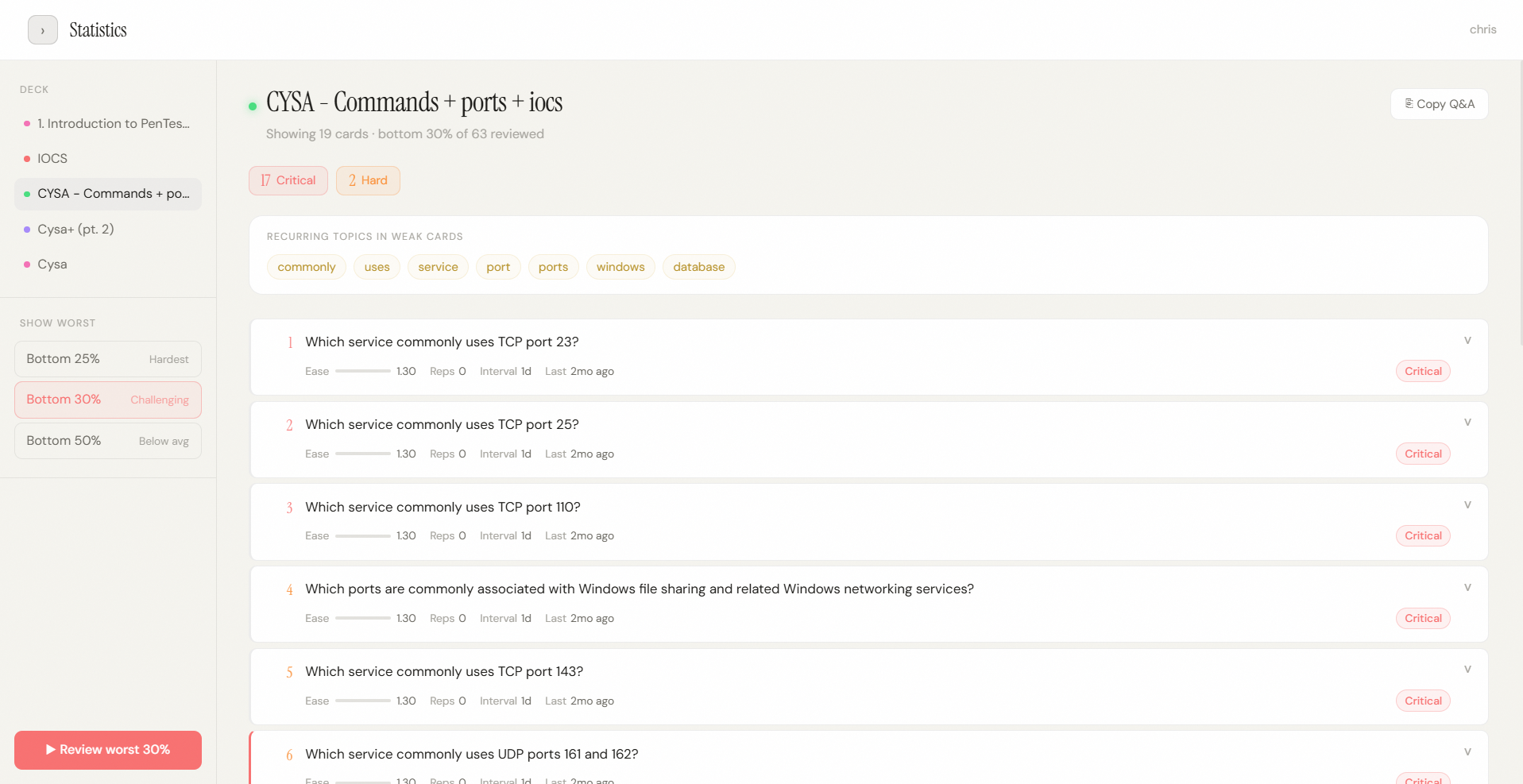 Weak-area analysis helps me find the cards that need the most attention instead of repeatedly studying material I already know.
Each weak card can show information such as how difficult it has been, how often I have reviewed it, and how long its current review interval is.
Memo also looks at the wording across those weaker cards and surfaces recurring topics. This helps me notice patterns—for example, if several of my weakest questions are related to ports, Windows, services, or another subject.
From the same page, I can immediately start a practice session containing only those weak cards.
Those practice sessions are kept separate from my normal review schedule, so I can drill difficult material without changing the card's real spaced-repetition progress.
Interactive Performance-Based Questions
I wanted Memo to support questions that feel closer to technical certification exams.
For that reason, I built a custom Performance-Based Question system.
A PBQ can include:
- a scenario
- multiple table rows
- dropdown questions
- drag-and-drop answers
- an answer bank
- explanations
- and an additional question at the bottom
Instead of hard-coding every simulation, I created a reusable question structure that tells Memo what columns, rows, answer choices, and interactions the question needs.
I also built a visual PBQ editor so I can create these questions without manually building each interface from scratch.
When I answer a PBQ, Memo checks the individual parts of the question, calculates the result, and lets me compare my answers with the correct ones.
This became one of the main features that separates Memo from a basic flashcard project.
Managing Large Study Decks
Some of my study decks contain hundreds of cards, so I built the deck editor around managing larger collections rather than only small demo decks.
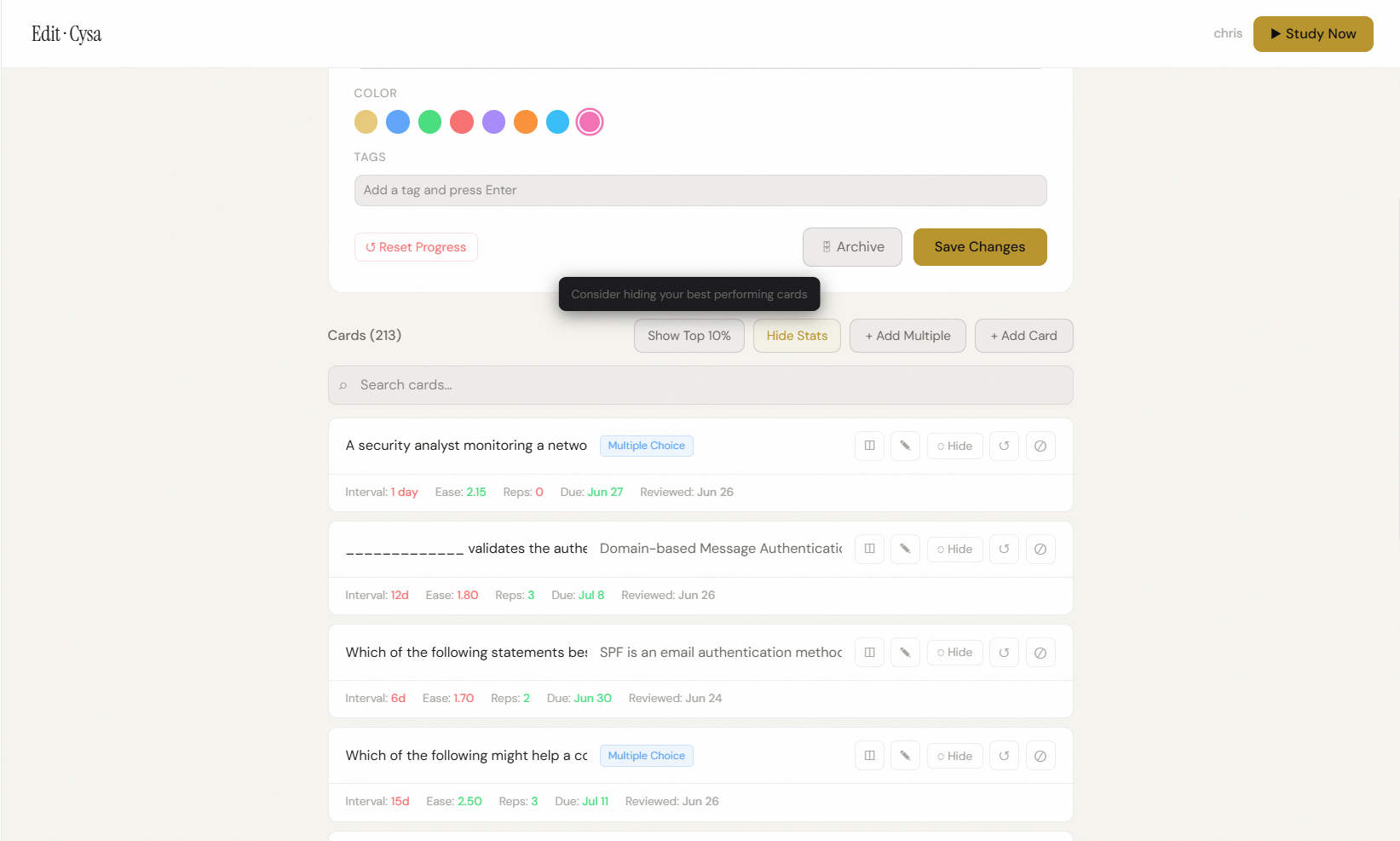 The deck editor combines card creation, search, study progress, bulk management, tags, and review controls in one place.
From the editor I can:
- search cards
- add one card
- add many cards at once
- edit existing cards
- hide cards without deleting them
- reset the progress of one card
- reset an entire deck
- view study statistics
- add deck tags
- change deck colors
- archive decks
- restore archived decks
- pin important decks
I also added a view for high-performing cards so I can see which material I already know well.
Duplicate Detection
Large decks also create another problem: accidentally adding the same question more than once.
When I add new cards, Memo compares them with questions already in my library.
It checks for both exact matches and questions with very similar wording.
If something looks like a duplicate, Memo warns me before I add it.
Bulk Card Creation
Creating a large certification deck manually can take a long time, so I built a bulk card workflow.
Memo provides a structured prompt that I can copy into an external AI tool.
The AI returns card data in a format Memo understands.
I can then paste that result back into Memo, where the application:
- checks that the data is valid,
- confirms the questions and answers are formatted correctly,
- checks for possible duplicates,
- shows me a preview,
- and then adds the cards to the deck.
I use the same general idea for generating more complex PBQ content.
The AI does not directly control the application or database. Memo still handles the validation, preview, duplicate checking, and saving of the final content.
Browse & Search
Memo includes a separate Browse page for finding study material without starting a study session.
I can search across my card library and filter by:
- deck
- Basic cards
- Multiple Choice cards
- PBQs
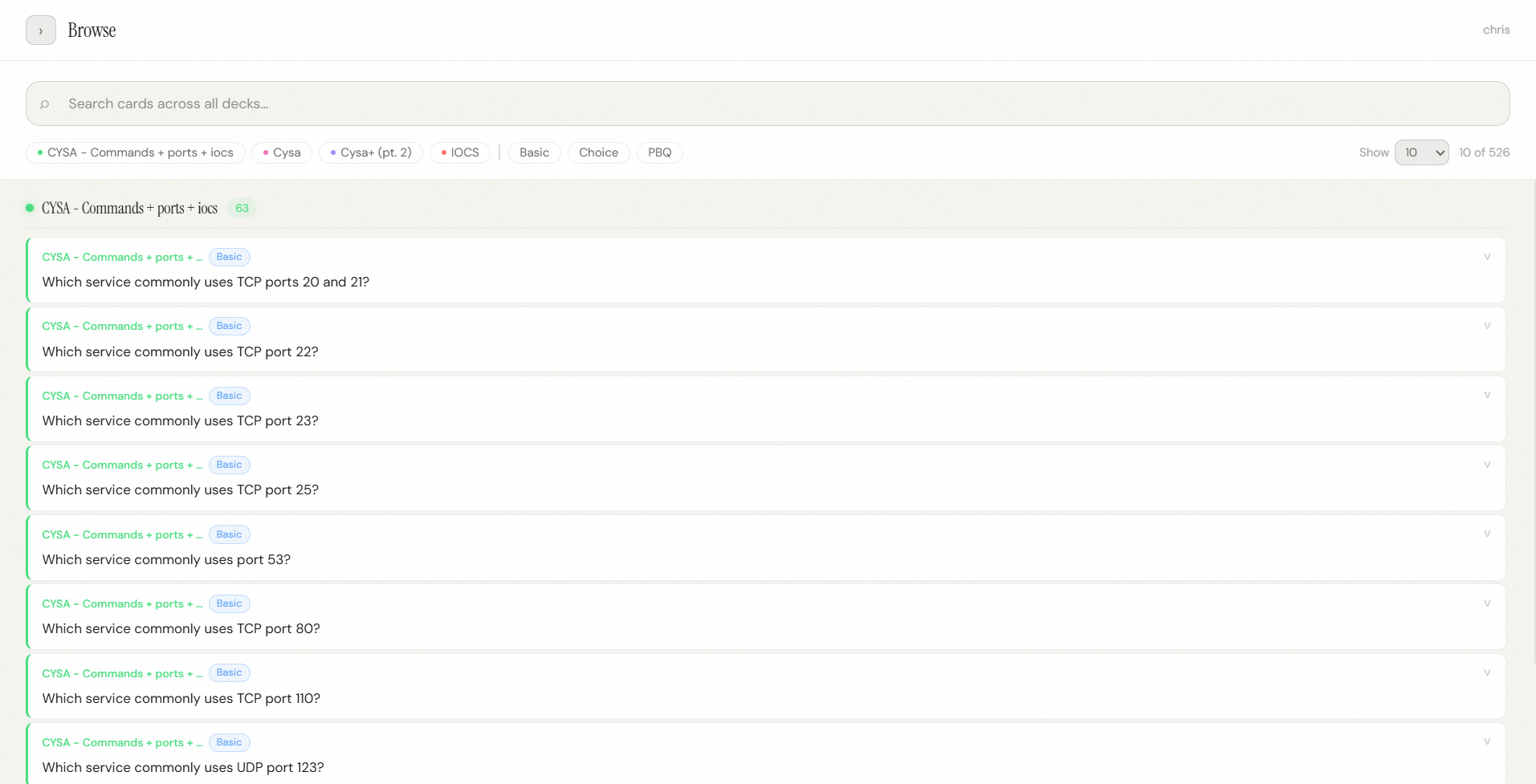 The Browse view makes it easier to search and filter through hundreds of cards across multiple study decks.
This became increasingly useful as my personal collection grew into hundreds of cards.
Technical Implementation
Memo is a full-stack web application built with Next.js, React, and TypeScript.
The application and backend live in the same Next.js project. Server-side actions handle saving and loading decks, cards, and study progress.
I use Neon PostgreSQL to store the actual study data, including:
- decks
- cards
- card types
- review progress
- future review dates
More complex question types such as Multiple Choice and PBQs use structured JSON data so the same card system can support very different types of study content.
Authentication is handled with Neon Auth, including email/password login and password recovery.
For voice studying, I used the browser's built-in speech synthesis and speech recognition features instead of relying on a separate speech service.
The application does not currently use an in-app generative AI API. AI is used as an optional external authoring tool for generating structured content that Memo can validate and import.
Architecture / Tech Stack
Study Logic
- SM-2-inspired spaced repetition
- Weak-card ranking
- Targeted practice sessions
- Duplicate-question detection
Browser Features
- Speech synthesis
- Speech recognition
- Clipboard API
- Local storage for interface preferences